Built for Tails and Trails | Designing a reliable way to track & monitor your pet.
To help pet owners track, manage, and care for their pets effortlessly through a smart, intuitive mobile app built around real-time needs and routines.
In early 2025, I was approached by an Indian startup that was developing a GPS-enabled smart collar for pets, a device that would allow pet owners to track their dogs in real time, monitor their walks, set safety zones, and manage pet-related routines, all through a companion mobile app.
At the time, the company had no existing app or visual direction. My responsibility was to design the entire mobile application from scratch, creating a seamless and user-friendly interface that would bridge the gap between the smart device and its user. The goal was to build a reliable, intuitive experience that could help pet owners feel more connected and in control of their pet's safety and daily routines.
Context
7 Weeks
Timeline
UX Research
UI Development
Role
1 Designer
2 Developers
1 Product Manager
Team
Figma
Tools
synopsis
Pet owners in India currently lack access to a well-designed solution tailored to tracking and managing their pets. Existing alternatives like AirTags or microchips offer limited interaction and poor usability, failing to meet the diverse, emotional, and functional needs of users, highlighting a gap for a dedicated, human-centered pet tracking app.
The Problem
A mobile first platform that simplifies how pet owners track, monitor, and care for their pets. Implemented features like live GPS tracking, virtual fences and intelligent reminders to help monitor the animal, and features like activity logs and health metrics so that the user is aware of any abnormal behavior shown by the pet.
The Application


Dashboard
All functions arranged in the hierarchy of their usage.
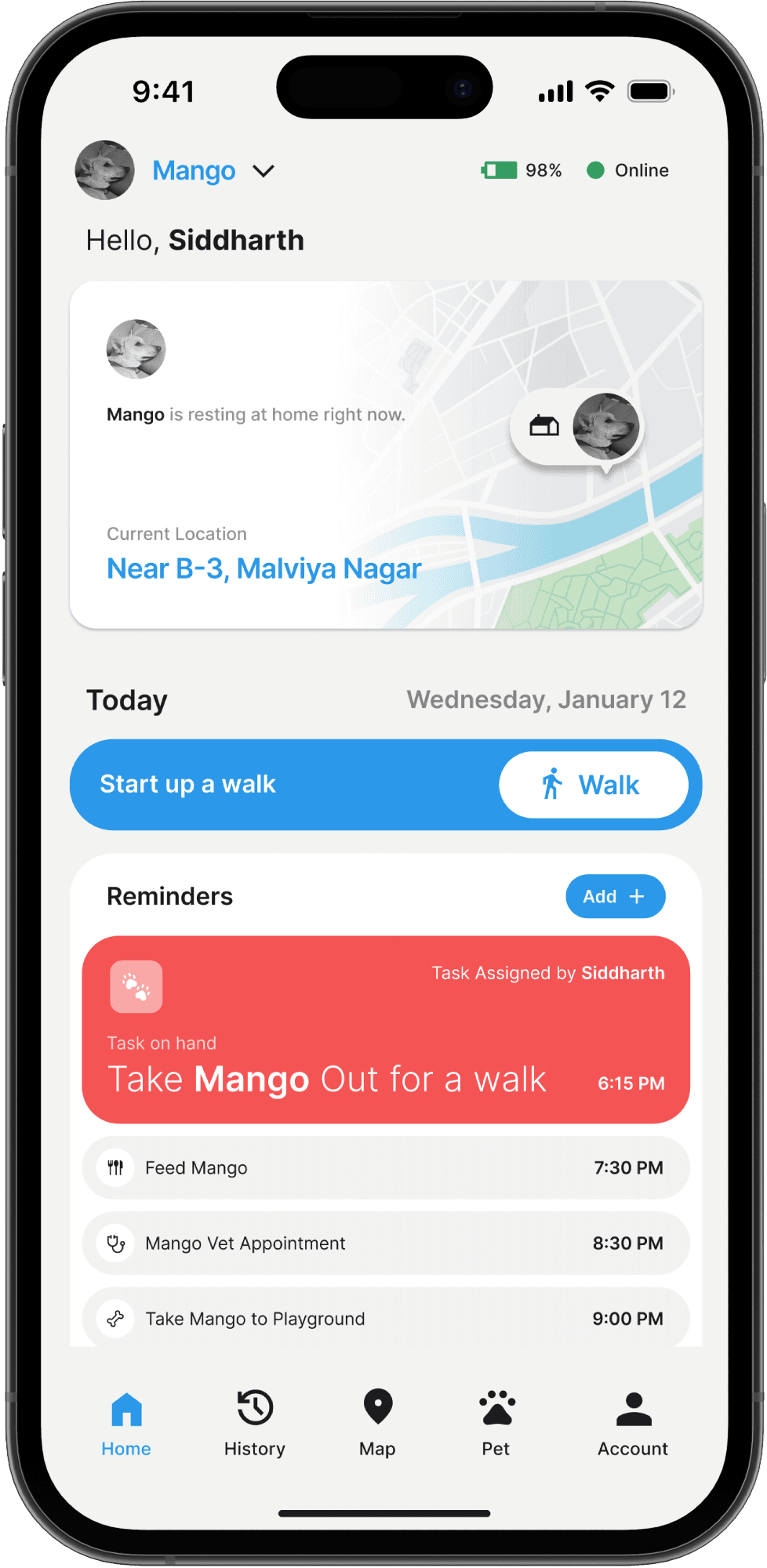
The Home Screen was designed with a clear usage hierarchy in mind, placing the most critical and frequently used features like Live Location, Walk Button, and Reminders front and center, followed by pet analytics.
Location and Tracking
Reliable tracking in both low and high power modes.
Live Tracking highlights the pet’s real-time location with quick access to actions like walks or switching pets.
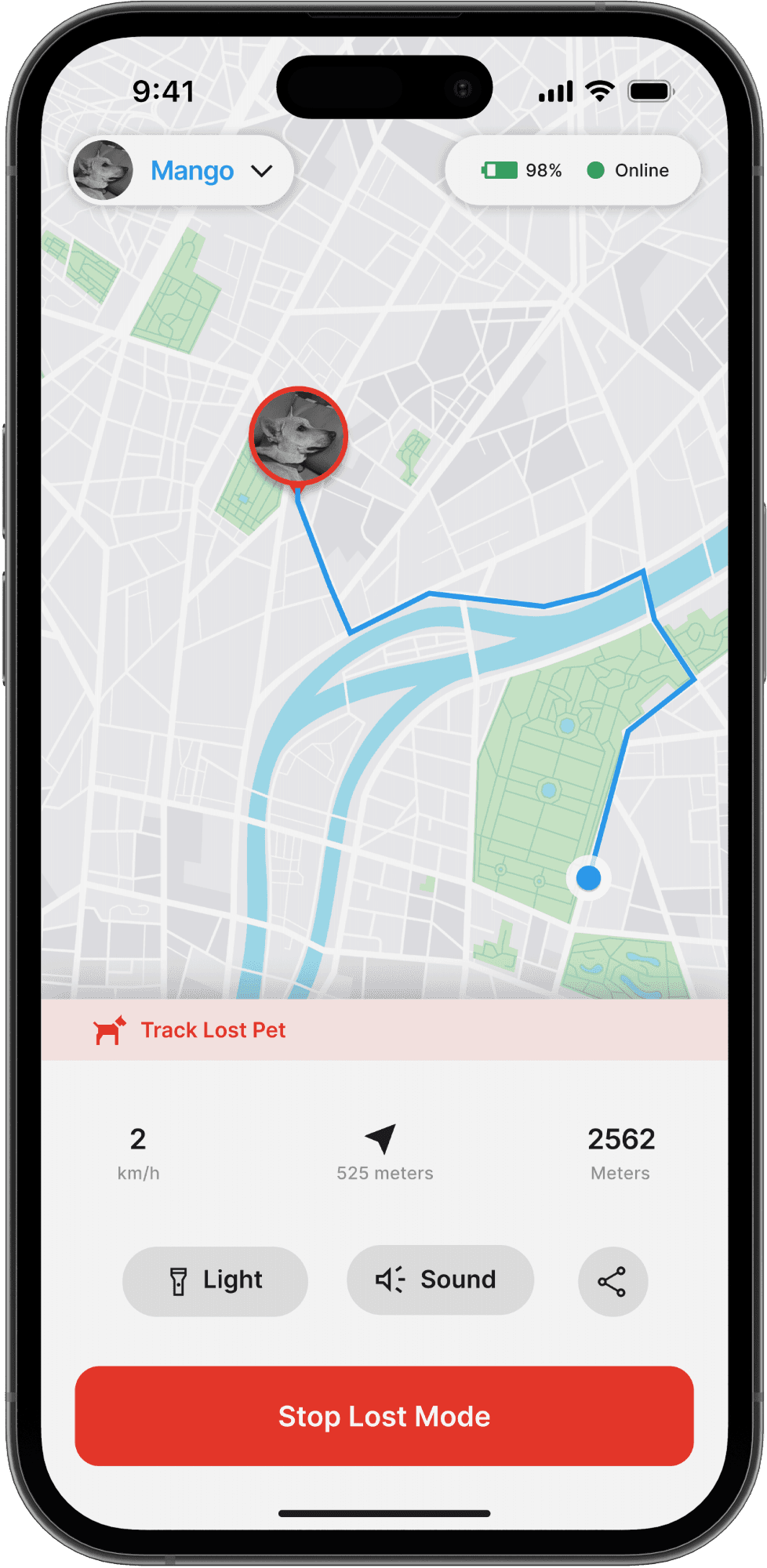
Lost Dog Mode shifts to a high-alert layout, giving you live GPS data and an alert radius, keeping distractions minimal for fast decision-making.


Dog Walks
All functions arranged in the hierarchy of their usage.
The Walk Function screen captures the route, distance, and time in real-time, with a clear visual path on the map. Core controls like start, pause, and end are placed for quick access, while live stats update as the walk progresses.
History Logs
A timeline that visualizes every step, stroll, and stop your pet makes.
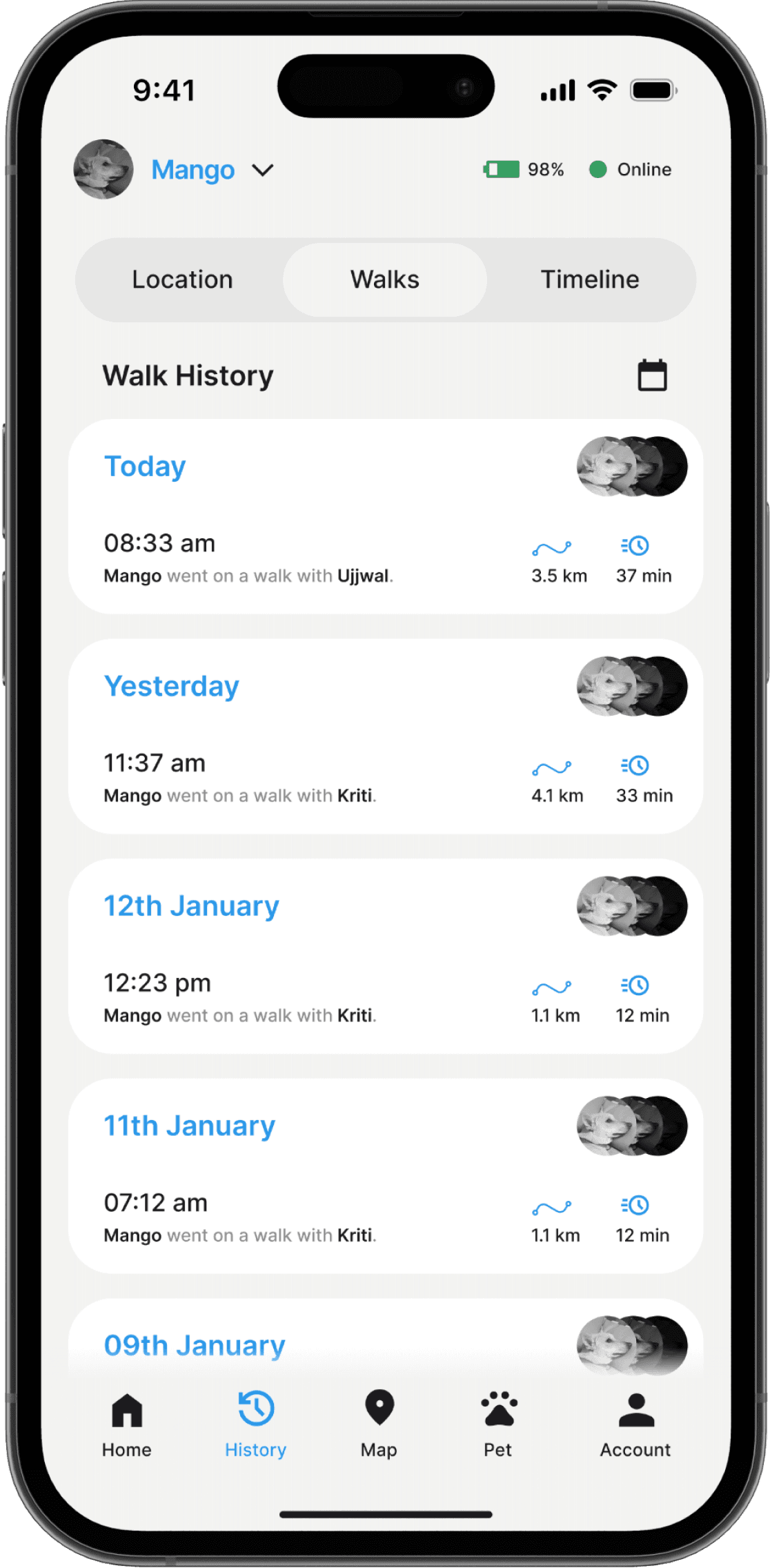
The History Log section is structured to display chronological data across three key categories: Location History, Walk Sessions, and Path Traces. Each log entry includes metadata like time, duration, and distance, along with an embedded map preview for spatial context. Users can filter by date and pet to check information to the related selection.


Health Analytics
Turning daily activity and rest into insights for a healthier, happier pet.
The Health Analytics presents insights on your pet’s sleep patterns, walk durations, and activity trends through clean, digestible visuals. Key metrics are highlighted up front, while comparative graphs allow users to monitor changes over time, enabling proactive care based on real behavioral data.
A mobile first platform that simplifies how pet owners track, monitor, and care for their pets. Implemented features like live GPS tracking, virtual fences and intelligent reminders to help monitor the animal, and features like activity logs and health metrics so that the user is aware of any abnormal behavior shown by the pet.
Methodology
Evaluate
Usability Testing
Walkthroughs
Developer Handoff
Research
Competitive Analysis
Interviews
User Personas
Design
Design System
Wireframing
UI Design
Prototyping
I started by talking to pet owners to understand their routines, concerns, and expectations from a tracking app. I also researched the Indian pet care space and global GPS solutions to spot key features and gaps.
I designed core user flows like live tracking, walk logs, and health insights, and created over 100 high-fidelity screens with a consistent visual language. I collaborated with developers throughout, provided assets, and iterated designs based on feedback to ensure a smooth handoff and implementation.
After the project was delivered for development, I refined the designed on my own and documented further feature sets that can be implemented in the future through an update.
My Contribution
To inform our UX strategy, we conducted a focused competitive analysis of global pet tracking apps, examining interaction models, navigation patterns, visual hierarchies, and feature discoverability.
This helped us identify common usability pitfalls and uncover key opportunities to design a more intuitive, localized experience for Indian users.
Competitive Analysis


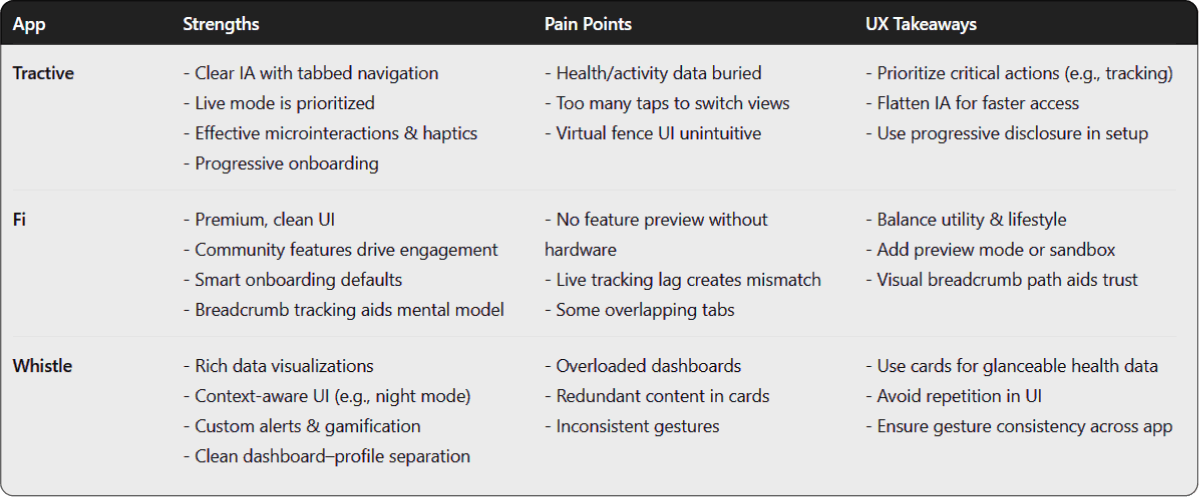
Most pet tracking apps emphasize features like live tracking, geofencing, and health logs—but suffer from cluttered interfaces and inconsistent user flows.
Key features like "Lost Dog Mode" and activity history are often buried under multiple layers of navigation, making them hard to access in urgent moments.
Visual hierarchy and map interactions are not always intuitive, leading to cognitive load during real-time use.
Many apps lack a localized UX approach, ignoring constraints like slower mobile networks or device limitations common in Indian markets.
Onboarding flows are frequently overwhelming, with dense information presented upfront instead of being gradually introduced.
These insights helped us define clearer navigation, prioritize urgent states like Lost Mode, and simplify the overall interaction model for everyday and emergency use.
Findings
To gain a deeper understanding of pet ownership in India, I conducted informal interviews with 8 dog owners across some Tier-1 and Tier-2 cities in India. These included working professionals, students, and families who owned dogs of various breeds and temperaments. The goal was to learn about their routines, concerns, and the tools they currently rely on to keep their pets safe.
We found that:
Losing a pet, even briefly, is a major source of anxiety. Several participants mentioned incidents where their dog slipped out of a gate or leash, and they had to ask neighbors or use WhatsApp groups to locate them.
None of the participants used a dedicated tracking device. Most relied on traditional methods like name tags, phone numbers on collars, or just keeping an eye on their dog during walks. Some experimented with AirTags but found the range or accuracy lacking.
Battery life and charging were seen as barriers. A common concern was forgetting to charge a device or the pet pulling it off. People wanted something that “just works” without needing constant maintenance.
Daily walks are often spontaneous. People didn’t track them, but liked the idea of seeing distance covered or time walked — not for fitness, but to build better habits.
Owners with busy routines wanted basic alerts. Not complex data — just a heads-up if their dog wasn’t moving for long or left a set area.
User Interviews
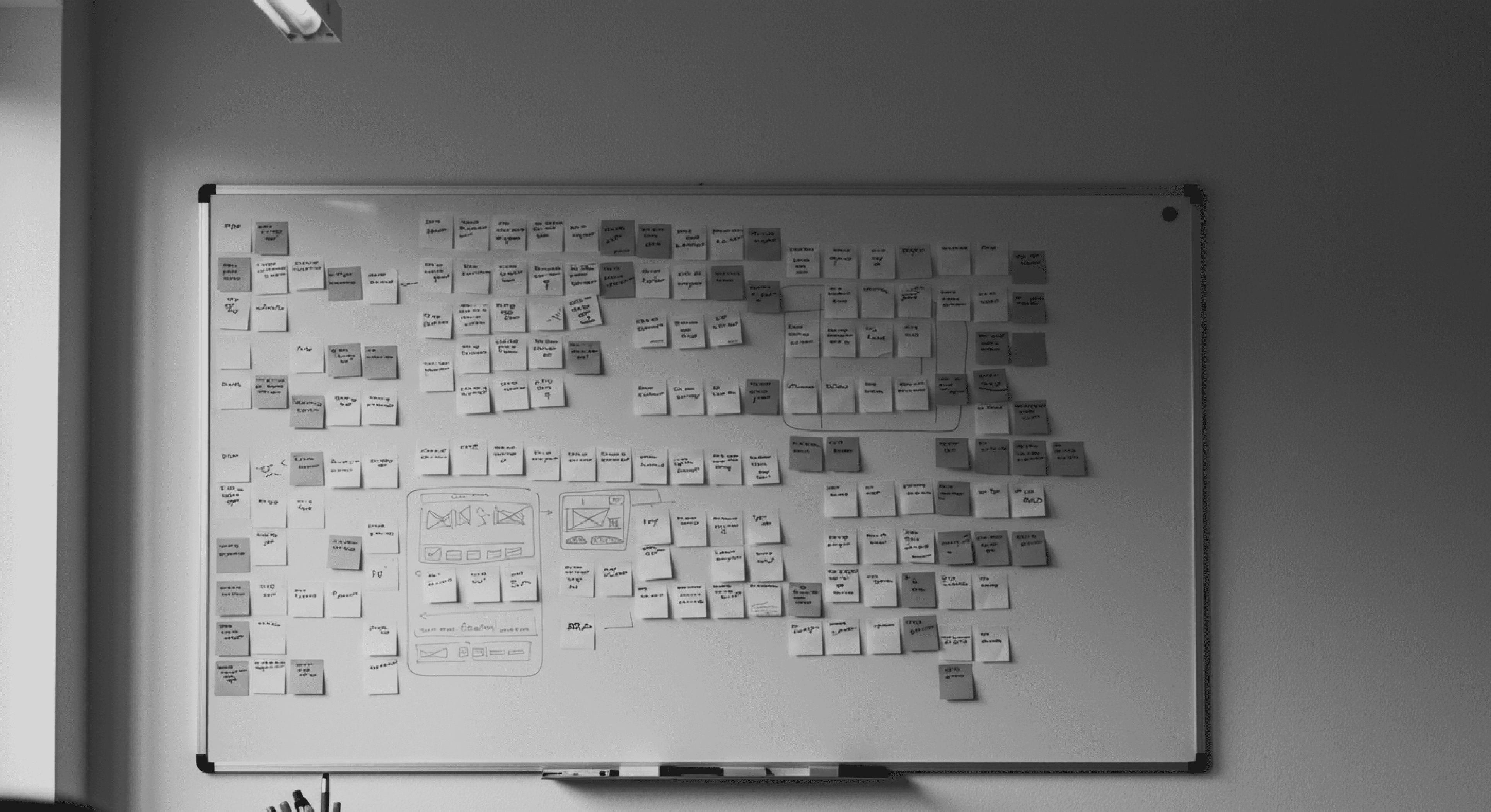
We did a round of affinity mapping to recognize trends and patterns from our research and interviews.
To align the team around user needs and ensure a user-centered design approach, I synthesized our interview findings into actionable personas that captured key behaviors, motivations, and pain points.
User Personas
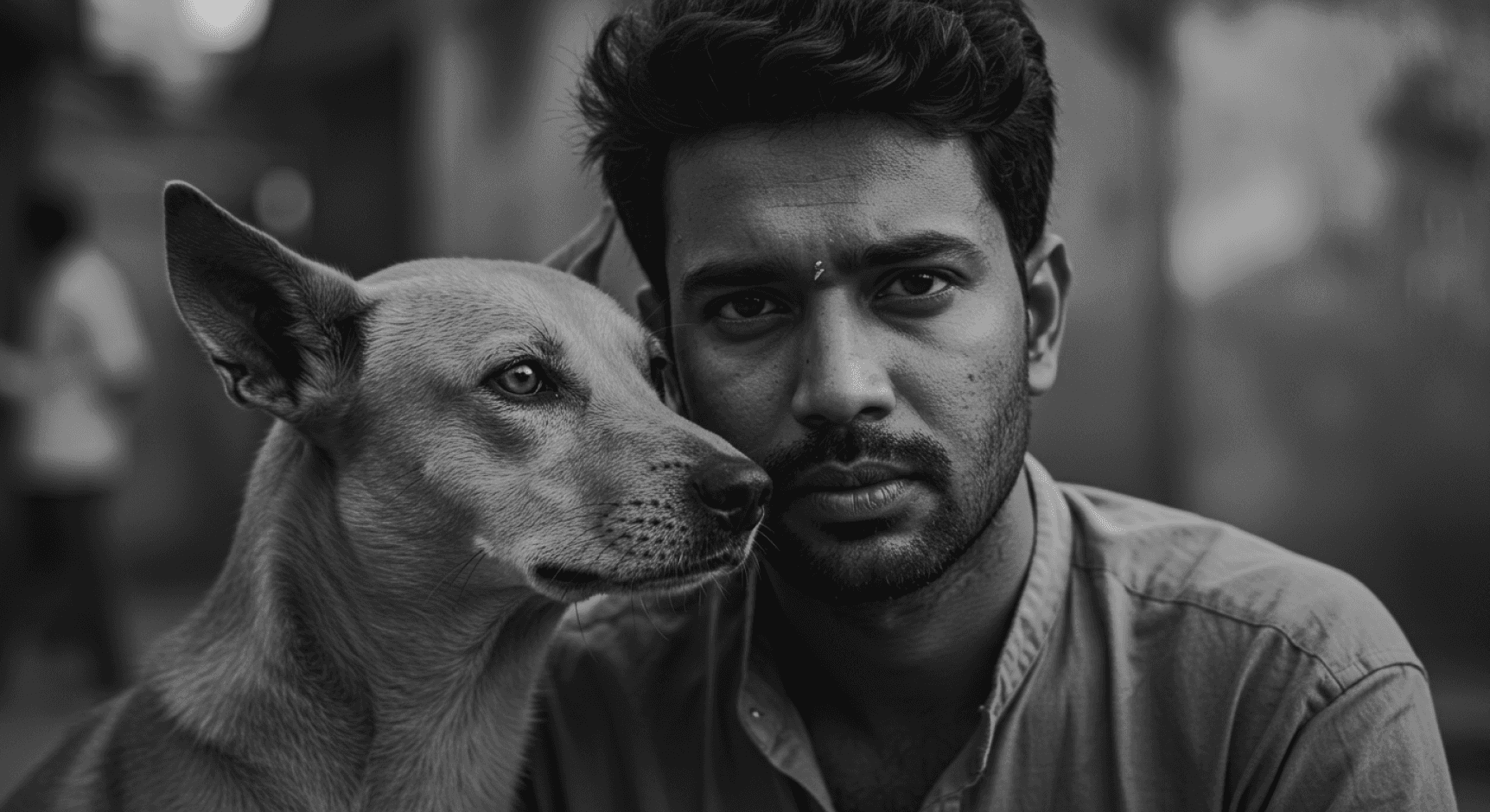
Needs:
Freedom to let his dog off-leash in safe areas, but without losing sight of where he runs off to.
A better sense of his dog’s stamina on long walks — sometimes it’s too much, other times too little.
A simple way to understand how active his dog has been across days — just out of curiosity.
Personality Trait: Easy-going, spontaneous, outdoorsy
Gets nervous when his dog runs out of sight, especially in crowded places or at night.
GPS collars he’s tried were bulky, unreliable, or had short battery life — so he stopped using them.
Doesn’t like complicated apps; most feel too “medical” or rigid for his spontaneous lifestyle.
Frustrations:
Kunal, owner of a 5-year-old Indie
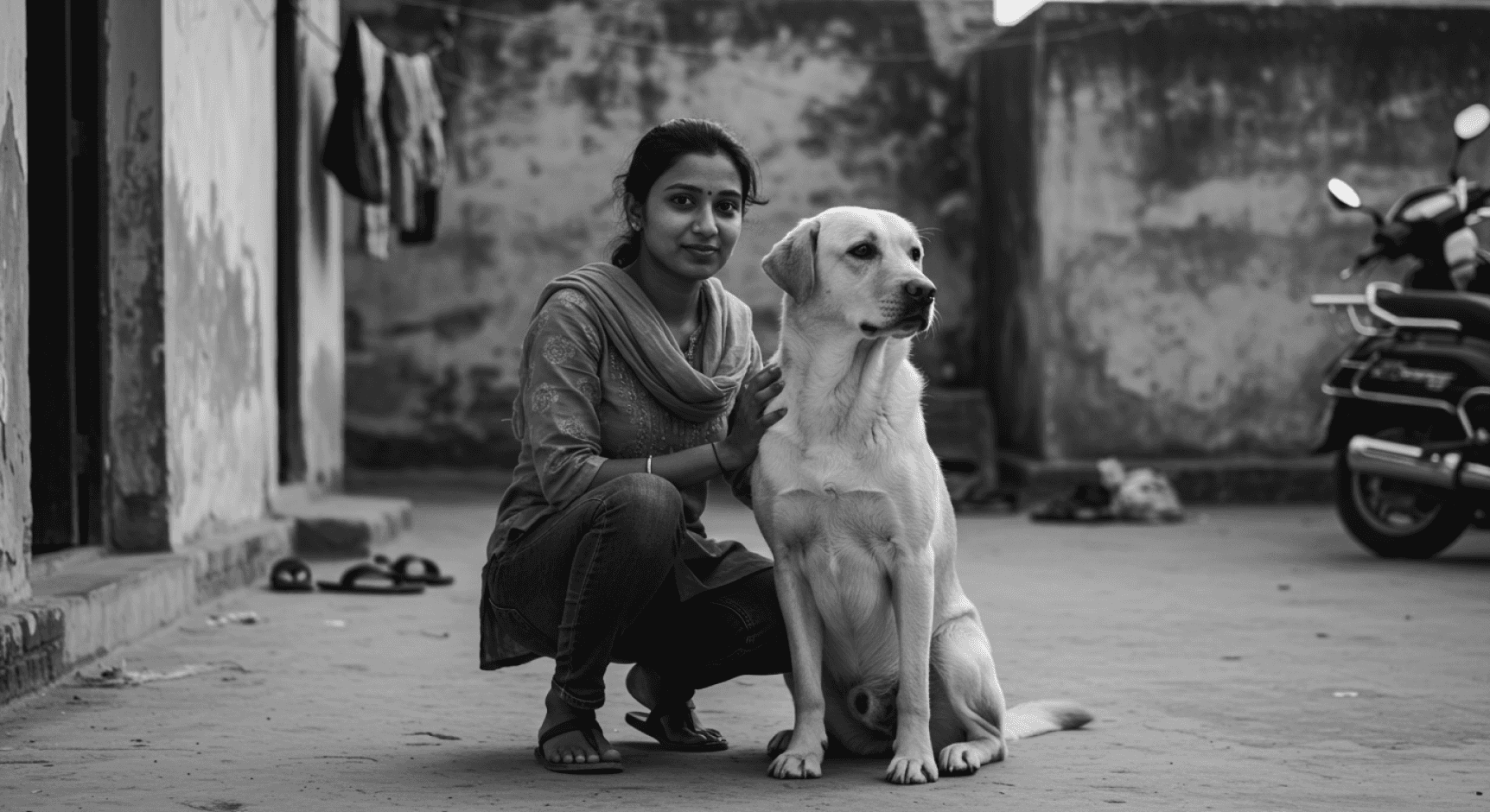
Nidhi, owner of a 3-year-old Labrador
Needs:
Clarity on her dog’s routine — she often wonders if he’s getting enough or too much sleep, food, or exercise.
A way to remember vaccinations and medications — she currently sets reminders manually but often second-guesses whether she gave the dose or not.
Reassurance that her dog is okay when she’s in meetings or has to leave him with a sitter.
She gets anxious when she doesn’t know if her dog’s behavior changes are normal (e.g., sleeping more, not finishing meals).
Using multiple WhatsApp chats and calendar notes for tracking pet stuff feels messy and unreliable.
Walkers sometimes don’t report exactly when or where they took the dog — making it hard to trust that the dog was walked properly.
Frustrations:
Personality Trait: Detail-oriented, proactive, a planner
CONCEPTION
Our ideation focused on designing a single, emotionally intelligent system that combines real-time location tracking, habit analytics, and accessible emergency tools — all structured around clear information hierarchy and minimal friction.
To guide this process, we anchored our brainstorming around questions that emerged organically from real user experiences and their pain points:
What’s the fastest way for someone to know if their dog has wandered off, without checking their phone constantly?
How might we help pet owners recall past walk routes and routines, especially if someone else (like a friend or walker) is involved?
Can we reduce panic in high-stress situations by guiding users step-by-step instead of overwhelming them with options?
How do we surface meaningful health patterns without requiring the user to "track" things manually every day?
How can we design for different types of owners - the overly cautious, the forgetful, the casual, without alienating them?
Ideation
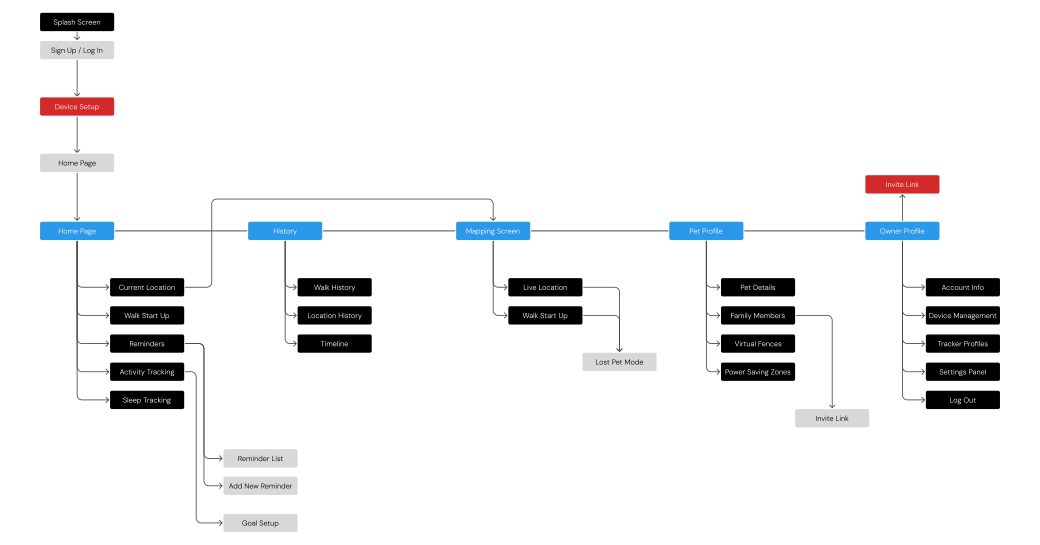
Information Architecture
To bring clarity to the product structure and ensure intuitive navigation, we defined a clear Information Architecture. This helped us organize the app’s features around user goals, like tracking their pet, monitoring health, or accessing historical data, while maintaining a logical, minimal-friction flow.
The IA served as the foundation for both our wireframes and navigation system, ensuring that all essential functionalities were easy to locate and access.
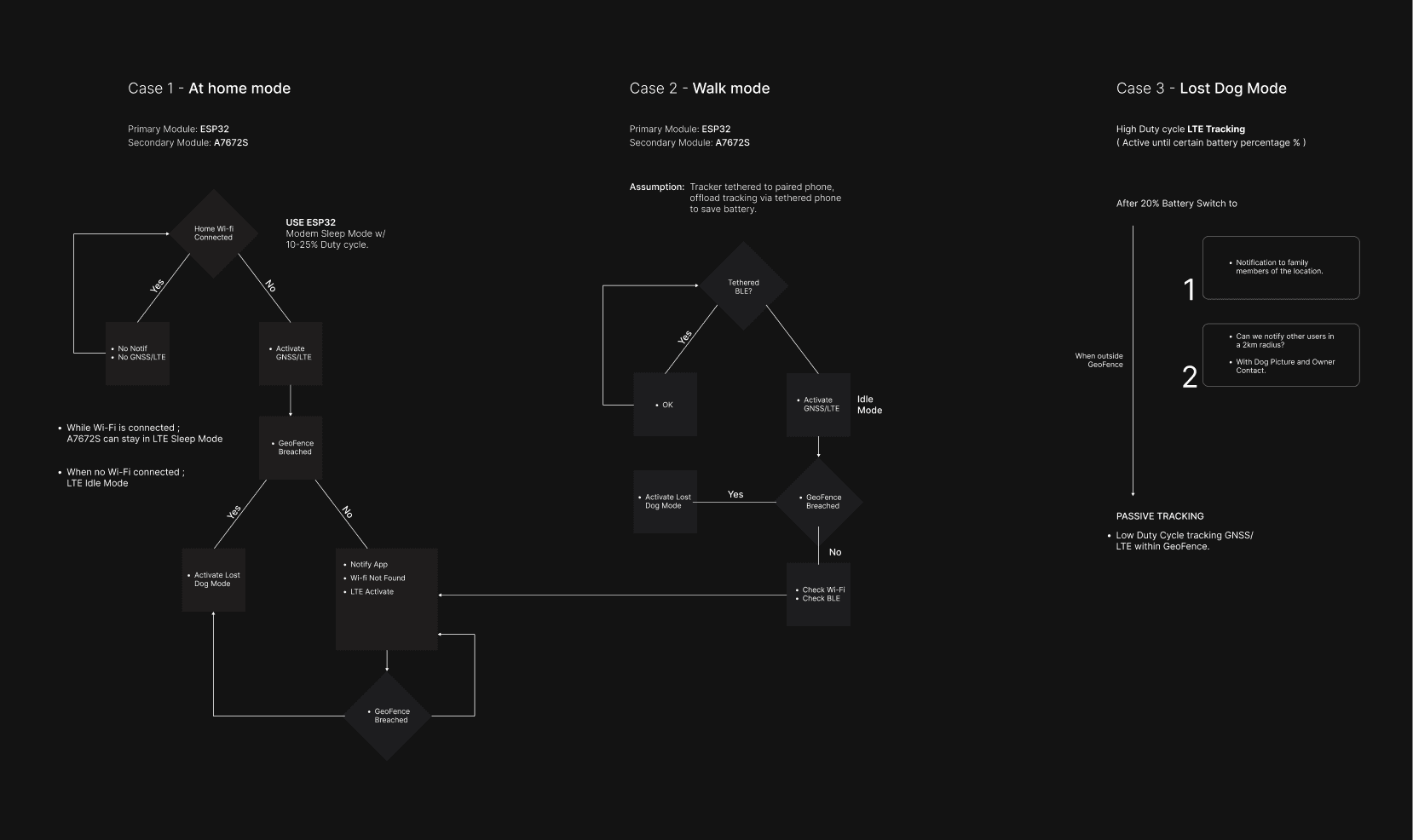
Decision Tree
As the startup had no existing design language, I took the initiative to establish a foundational design system from scratch. The goal was to ensure visual consistency, scalability, and efficient collaboration between design and development teams.
Typography : A clean, readable type scale was chosen to support hierarchy and accessibility, using a modern sans-serif font that aligns with the brand’s tone - reliable.
Color Palette : I created a calming but alert palette with primary tones of deep blue and vibrant orange to convey trust and urgency. Secondary neutrals helped maintain visual balance across screens.
Components : Designed UI components such as buttons, toggles, cards, and tab bars - optimized for both light and dark themes. All components were built to be reusable and responsive across screen sizes.
Grid & Spacing System : A modular grid system was implemented for consistent alignment and spacing, streamlining both layout structure and development handoff.
Interaction States : Detailed hover, pressed, disabled, and success/error states were designed for all interactive elements, enhancing usability and feedback.
Documentation : Everything was organized and delivered via Figma component libraries with clear naming conventions, enabling developers to pick up and implement designs smoothly.
Foundational Design System
Inter
Regular
Aa Bb Cc Dd Cc Ee Ff
Gg Hh Ii Jj Kk Ll Mm Nn Oo Pp Qq
Rr Ss Tt Uu Vv Ww Xx Yy Zz
01234567890
!"£$%&/()=?^
01234567890
!"£$%&/()=?^
Aa Bb Cc Dd Cc Ee Ff
Gg Hh Ii Jj Kk Ll Mm Nn Oo Pp Qq
Rr Ss Tt Uu Vv Ww Xx Yy Zz
Light
01234567890
!"£$%&/()=?^
Aa Bb Cc Dd Cc Ee Ff
Gg Hh Ii Jj Kk Ll Mm Nn Oo Pp Qq
Rr Ss Tt Uu Vv Ww Xx Yy Zz
Bold
Neutral
Primary Palette
Secondary Palette
Success
Warning
Error
Used to support secondary color in backgrounds, text colors, separators, etc.
Used across all the interactive elements such as CTA’s, links, active states, etc.
#EEEEEE
#DBECF9
#FFF8E3
#E1EFE2
#FFEBCD
#000000
#C0C8D0
#177FCD
#F7CE45
#359D60
#FFAE35
#000000
#E6E7E8
#A5D4F6
#FEF0C8
#AEE7C5
#F8CA86
#000000
#989FA6
#095E9D
#C6A639
#298A51
#E4931A
#000000
#D5E2EF
#7CBEF0
#FBE7A1
#78D49E
#F2B963
#000000
#000000
#000000
#000000
#000000
#000000
#000000
#C6D1DD
#2C98E9
#F9DC7C
#69CC92
#F3B251
#000000
#000000
#000000
#000000
#000000
#000000
#000000
Used alongside the primary to indicate to the user it’s the secondary focus if the Brand has a Secondary color.
Emotion of positivity, generally used across all success and complete states.
Emotion of holding, generally used across warning states.
Emotion of negativity, generally used across error or failure states.
Color
Map
Pet
Account
Home
History
Map
Pet
Account
Home
History
Map
Pet
Account
Home
History
Map
Pet
Account
Home
History
Map
Pet
Account
Home
History
Map
Pet
Account
Home
History
1
Map
Pet
Account
Home
History
Map
Pet
Account
Home
History
Map
Pet
Account
Home
History
Map
Pet
Account
Home
History
Map
Pet
Account
Home
History
Map
Pet
Account
Home
History
1
Bottom Navigation Bar
Components
Rest
Rest
Hover
Hover
Disabled
Disabled
Rest
Enabled
Filled
Focused
Disabled
Invalid
Rest
Rest
Segmented
Switches
Selections
Sliders / Progress Bars
Dim
Dim
Ghost
Ghost
Buttons
Buttons
Fields
Menu Items
Button
Button
Button
Button
Button
Button
Button
Button
Button
Button
Button
Button
Button
Button
Button
Button
Button
Button
Toggle 1
Toggle 2
Toggle 3
Input
Label
Input
Label
Toggle 1
Toggle 2
Label
Label
Label: Selection
Selection
Label
Heading
Neque porro quisquam est, qui dolorem ipsum quia dolor sit amet
Mango

Input 1
DESIGN
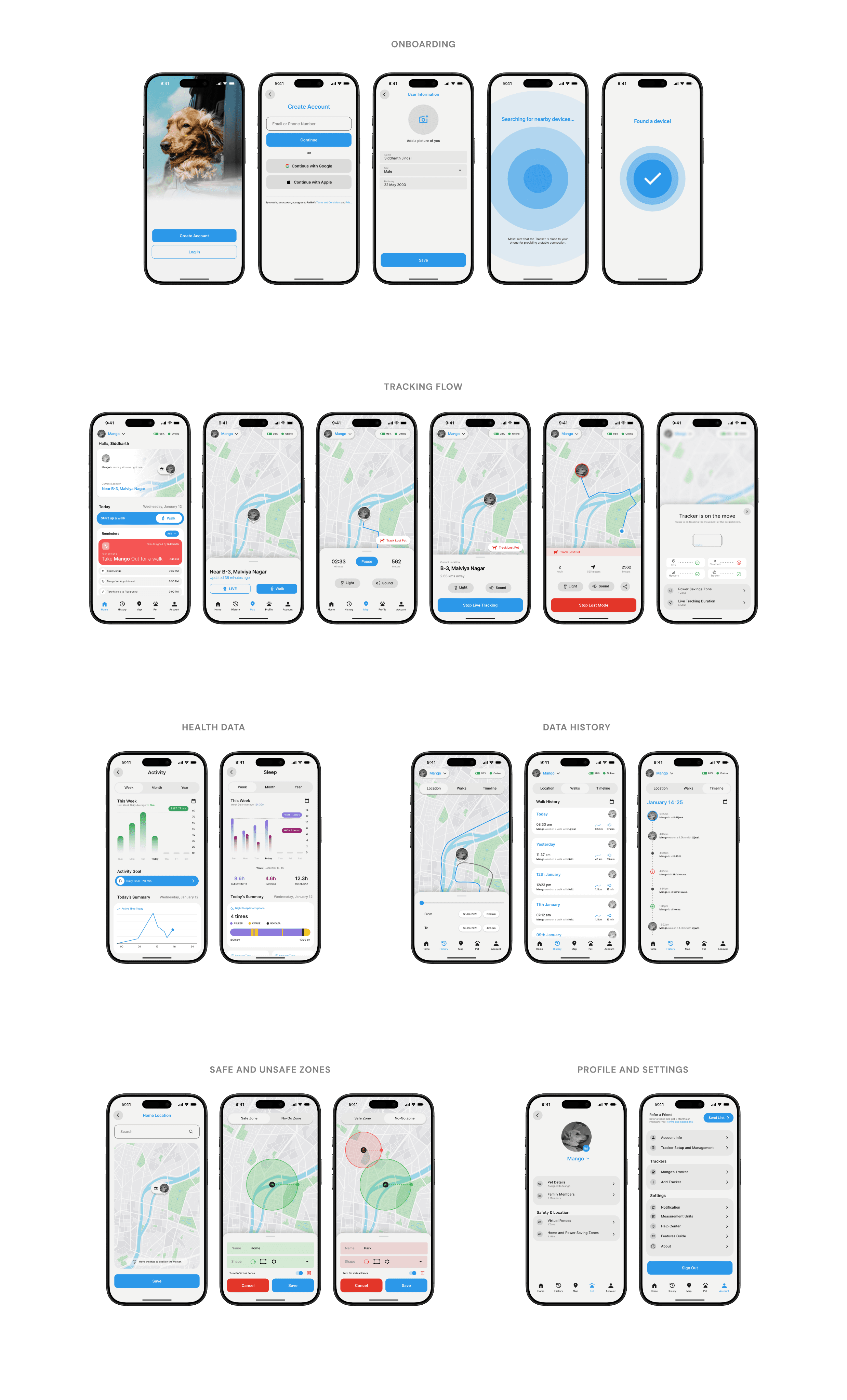
The high-fidelity designs bring together the core ideas shaped by our research and early concepts. At this stage, the focus was on refining the interface to be clear, approachable, and practical for everyday use, while staying true to the needs we uncovered during the process.
I used the design system we had established and constructed the final flows on Figma, then I prototyped all the flows together so we could hand it off to the Dev Team.
High-Fidelity Design
Before arriving to the final flow you saw above, we had done rounds of testing with our initial ideas and prototypes to smoothen out the user flow. Some changes that were made are:
Design Iterations made to smooth out the experience
Home Screen
Before
After
Map
Pet
Account
Home
History
98%
Online
Hello, SIddharth
Today
Sunday, January 12
12%
View
View
Mango
Mango is resting at home right now.
Current Location

Near B-3, Malviya Nagar
Steps
Sleep
8,775 / 52%
6 h 43 min of 9h
INTENSITY : MODERATE
Last night
24% decrease this week
24%
Reminders
Walk
Task on hand
Task Assigned by Siddharth
6:15 PM
Take Mango Out for a walk
Feed Mango
7:30 PM
Mango Vet Appointment
8:30 PM
Take Mango to Playground
9:00 PM
Add
Activity
33min / 70min
Sleep
9h 44min
Last night
8.6h average this week
Today
33% goal completed
Today
Wednesday, January 12
Hello, Siddharth
Mango is resting at home right now.
Current Location
Near B-3, Malviya Nagar
Start up a walk
Map
Pet
Account
Home
History
98%
Online
Mango
The redesigned screen focuses on task completion and clarity
The addition of a clear call-to-action ("Start up a walk") at the top improves task discoverability.
Reminders are now grouped and color-coded by urgency, enhancing standability and reducing cognitive load.
Metrics like activity and sleep are still available but moved to the bottom to avoid distracting from primary actions.
Overall, the redesign improves information hierarchy, task prioritization, and overall usability by making key actions more accessible and relevant.
Mango is resting at home right now.
Current Location
Near B-3, Malviya Nagar
Mango is out on a walk with Parth.
Track Live Location
Currently near
Apex Circle, Malviya Nagar
Mango just got out of a safe zone!
Track Lost Pet
Last seen
Park Street, C-Scheme
When the pet is at Home.
When the pet is out of home, or on a walk.
Emergency State, when the pet is out of safe zones.
Addition for the betterment of performance and user clarity
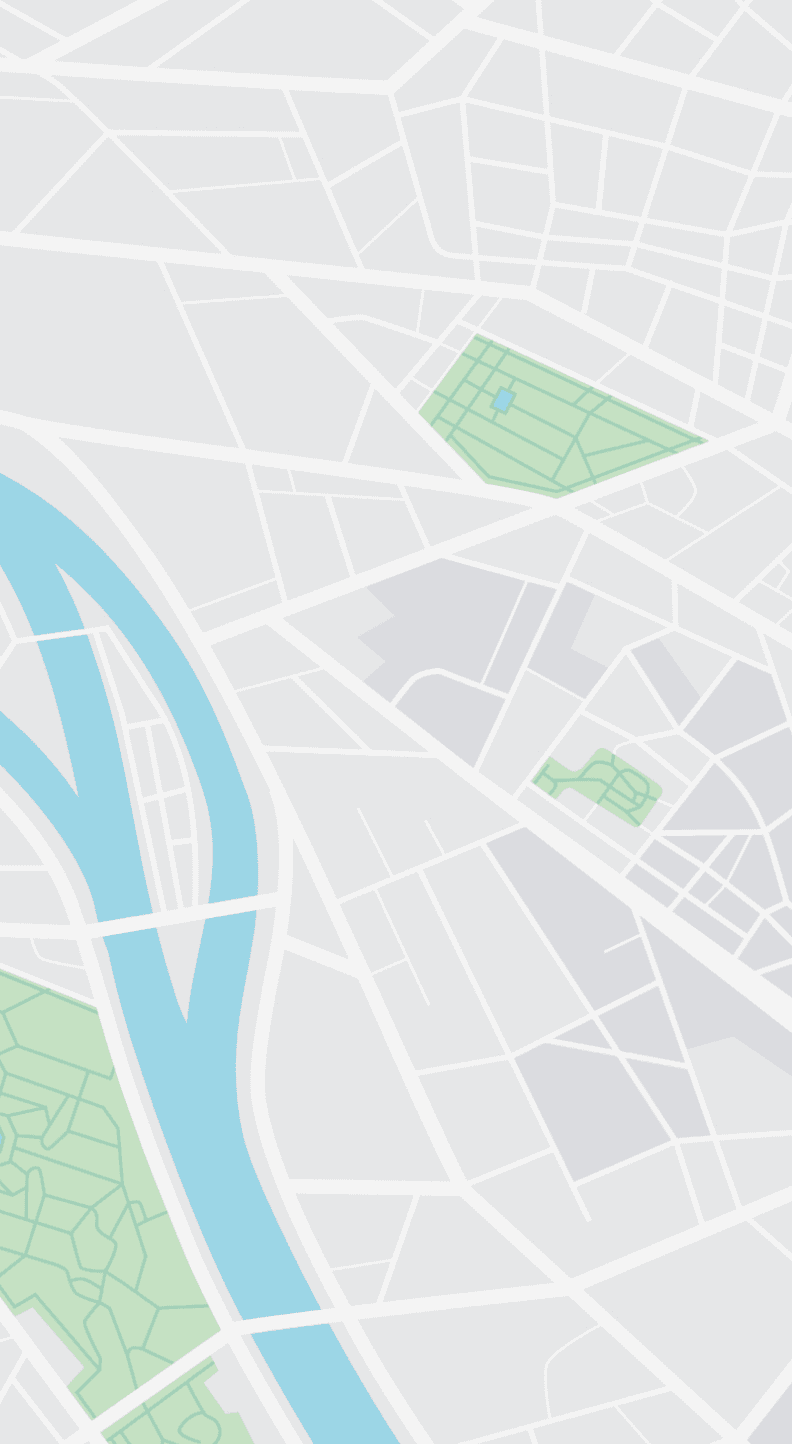
A location widget replaces the full-screen map, reducing Google Maps API calls and saving data and CPU resources.
Current pet location and status are now shown instantly, improving app speed and providing essential info at a glance.
Avoids reloading heavy map assets on each app open, improving performance on low-end devices.
Overall, the redesign optimizes app loading time, minimizes unnecessary resource consumption, and improves the user experience without compromising on core functionality.
Location Data History
Before
Map
Pet
Account
Home
History
9:41
98%
Online
Mango
13-Jan-2025
4:25 pm
12-Jan-2025
2:33 pm
After
From Path Tracking to Complete Activity History
Initially we had only added a page that would let the user see the path history of their pet, this was a function that all major competitors had and we implemented it in the same manner. Upgrading upon that, we implemented a Walk History section and a Timeline Section.
Displays detailed logs of individual walks with time, duration, and location.
Shows a chronological list of all key activities and visited locations.
Instead of keeping separate menu pages for this info, we categorized them directly into the History Section, and gave a easy to use toggle switch on the top bar.
LATEST PROTOTYPE
The final high-fidelity prototype integrates all research insights, usability learnings, and visual design directions.
Due to NDA constraints, direct access to the interactive prototype is restricted. However, a password-protected Figma link is available upon request for review by stakeholders or hiring managers under confidentiality agreements.
Please reach out for access credentials if you'd like to explore the live prototype in detail.
Request Full Prototype
SIGNING Off!
Balance user needs with technical constraints: I learned how to negotiate features that were ideal from a UX perspective but needed to be adapted for development feasibility.
Drive a design system from scratch: Creating a visual and functional language for a startup with no prior design foundation challenged me to think systematically and ensure consistency across the product.
Design with empathy under limited access: Without direct user research, I leaned heavily on competitive analysis and interviews, learning how to extract meaningful insights with limited data.
Collaborate across disciplines: Including developers early on helped me design more realistically and anticipate edge cases in functionality and flow.
My Personal Learnings
We’ve got a few fun ideas in mind for the future, like adding a light social space where local pet parents can share updates, tips, or even plan meetups. Just a way to bring the community a little closer.
Add a localized pet community feature for owners to connect within their area.
Enable content sharing (photos, tips, reviews) to build trust and engagement.
Introduce event-based interactions like meetups, lost & found, or adoption drives.
Future Plans
Status
After completing the design phase, the app was handed over to the development team. It is currently under active development, with a beta version already live on the Google Play Store for early users to explore and test.